SkipTo.js for WCAG Bypass Blocks

Anatomy of SkipTo.js Menu
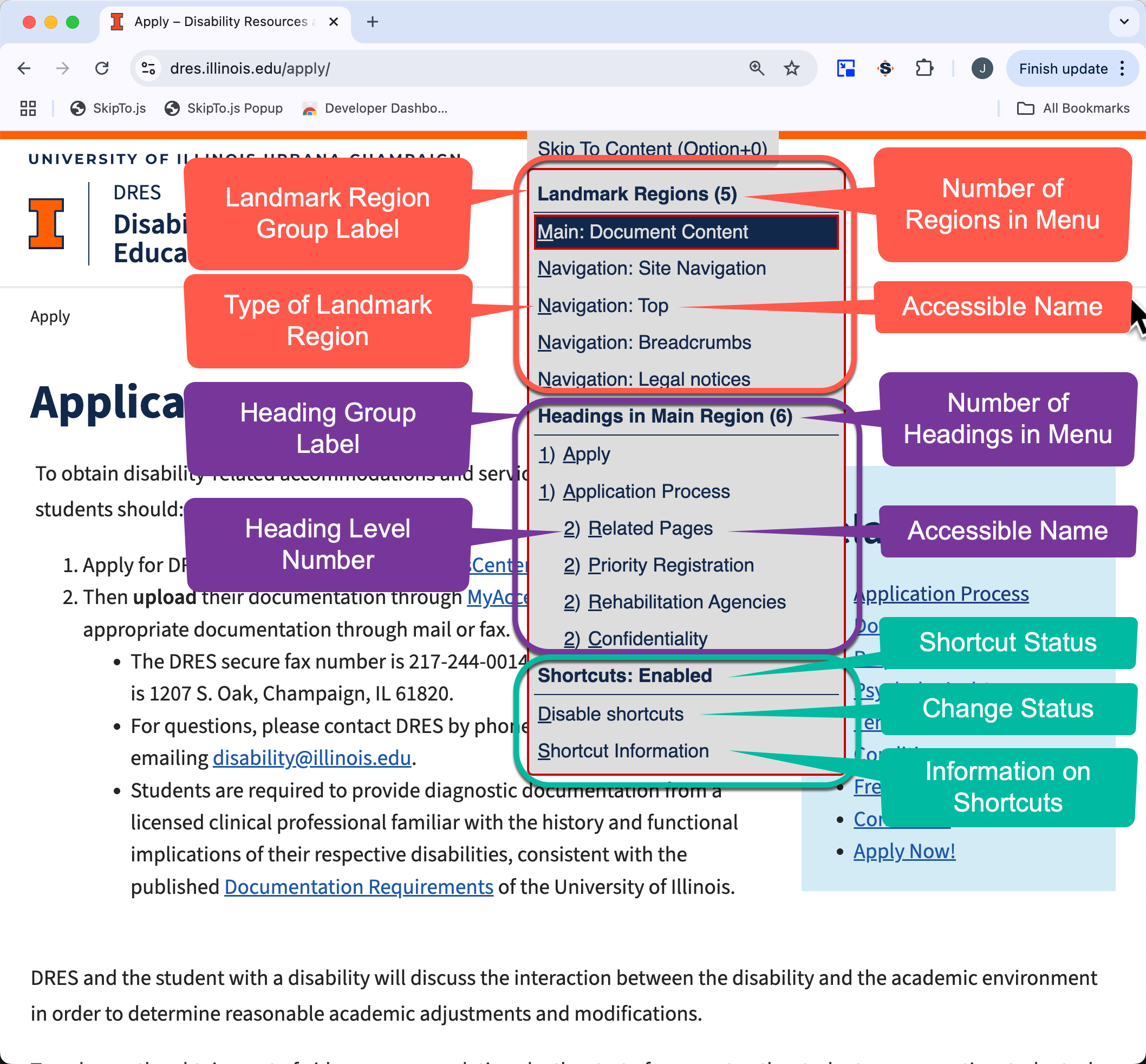
Screen shot of SkipTo.js menu features with call out pointers
Features of the SkipTo.js Menu

Detailed Information on SkipTo.js Menu

Feature Description
"Skip To Content" Button
  • Opens and closes the menu of landmark regions and headings.
  • Button can initially be hidden or visible on the web page.
  • A shortcut key can be used to open the menu from anywhere on the page:
    • macOS: Option+0
    • Windows/Linux:Alt+0
  • Button is first tab stop on the web page.
Landmark Regions
  • Landmark regions are the first section of the menu.
  • First menu item is the group label "Landmark Regions" and the number indicates how many landmarks are in the menu.
  • By default the landmarks are listed in order of importance on the page:
    1. Main
    2. Search
    3. Navigation
    4. Complementary
    5. Contentinfo
  • When a landmark region has an accessible name, it is included in the menu item after the region type.
Headings
  • Heading are the second section of the menu.
  • The section includes a group label "Headings" and the number indicates how many headings are in the menu.
  • The headings are listed in document order.
  • The number before the heading name indicates the level of the sub-section heading. Level 2 headings are sub-sections of level 1 headings, level 3 headings are subsections of level 2 headings and so on up to heading leel 6.
  • The accessible name is after the heading level.
Shortcuts
  • The Shortcuts group label indicates whether the shortcuts are currently enabled or disabled.
  • The first menu item is used to change the state of the shortcuts.
  • The second menu item opens a dialog box showing the current keyboard shortcuts.